> For the complete documentation index, see [llms.txt](https://cryptomu.gitbook.io/mu-crypto/llms.txt). Markdown versions of documentation pages are available by appending `.md` to page URLs; this page is available as [Markdown](https://cryptomu.gitbook.io/mu-crypto/game-system/connect-to-sns.md).
# Connect To SNS
#### Connect To SNS
##
### Connect to SNS
* This system is that you can simply link with Facebook to be provided information.
* This system provides ease to check information you have set up from outside using Facebook on a mobile phone.
* There is not limited level or area.
* If you want to cancel, you can remove the application on the list of Facebook and the message will not be sent anymore.
### How to use
* Select \[Connect to SNS] by pressing ‘J’ button on a keyboard or menu of system like the reference image below.
\
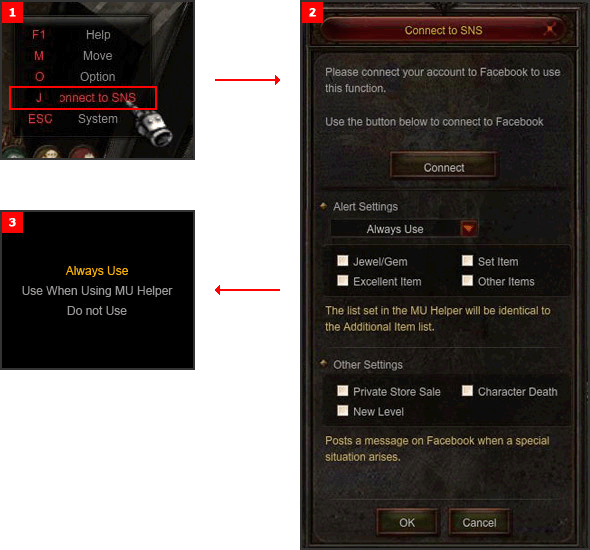
* When you select \[Connect to SNS], a menu will pop up like the reference image.
* It is divided the first connect, change and error text and a text will be alarmed in each case.
* Alert Settings contains following menus and the connection function works in the checked situation.
* Detailed Information of Connect Setting
| Name | Description |
| ---------------- | ------------------------------------------------------------------------------------------------ |
| Connection | A text will be alarmed on the top in each case, the first connect, a change and an error text. |
| Alert Settings | A message will be posted on Facebook, when the Alert Setting is set up. |
| Jewel / Gemstone | When your character obtained a jewel or a gemstone, an alert message will be posted on Facebook. |
| Set Item | When your character obtained a set item, an alert message will be posted on Facebook. |
| Excellent Item | When your character obtained an excellent item, an alert message will be posted on Facebook. |
| Other Items | When your character obtained an additional item, an alert message will be posted on Facebook. |
| Personal Store | When your items in a personal store is sold, an alert message will be posted on Facebook. |
| Personal Store | When your character is died, an alert m.essage will be posted on Facebook. |
| New Level | When your character leveled up, an alert message will be posted on Facebook |
### Facebook setting
* Click \[Connect] to connect Facebook.
\
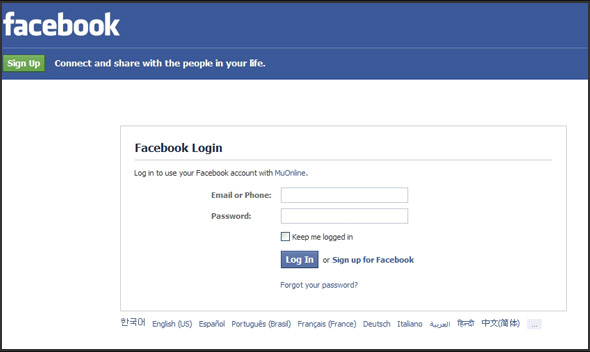
* Log in Facebook with your Facebook account.
\
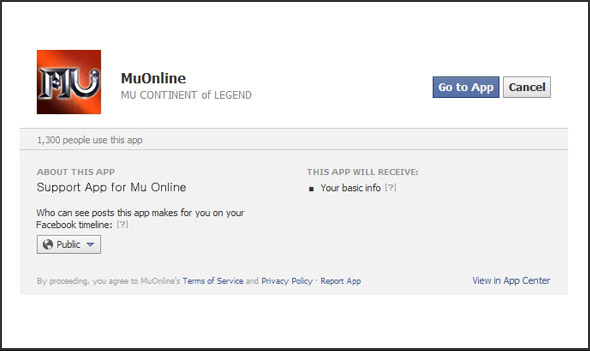
* Click \[Play] to move next page.
\
![Click \[Play\] to move next page.](http://image.webzen.net/Mu/guideImage/season8/img_sns04.jpg)
* This page is to permit posting messages on user Facebook.
* When approval is completed, a message will be automatically posted in case a special situation arises.